
When you expect your message to send one way and instead you see a green text message, it can make you wonder what changed. You may worry something is wrong with your phone, your plan, or the other person’s phone.
This guide explains what a green text message usually means, the most common reasons you see it, and what you can do if your messages changed from blue or chat-style bubbles to simple green ones.
💬 What A Green Text Message Usually Means
A green text message usually means your phone sent a regular SMS instead of a special chat message.
In many phones, blue or special-colored bubbles use internet-based messaging.
Green bubbles often mean the message is going through the normal SMS network.
This change can happen even if nothing seems wrong at first.
It can be caused by settings, signal changes, or contact type.
Sometimes the other person is not on the same messaging system as you.
Sometimes the internet is weak and the phone falls back to SMS.
A green text message does not mean failure by itself.
It just means a different path is used to deliver your words.
Knowing this can help you decide if you need to change anything.
💬 Green Text Message Instead Of Chat Or Data Message
Many modern phones support advanced chat features.
Those messages can show read receipts, typing indicators, and high-quality media.
When these features are active, bubbles may appear in a special color.
If those features turn off, the phone may send plain SMS instead.
That is when your bubble might turn into a green text message.
This can happen if chat features are disabled in your settings.
It can also happen if your network cannot support advanced messaging at that moment.
Switching between chat and SMS is often automatic.
So seeing green does not always mean something bad.
It often just means the message used a simpler, more basic method.
💬 When Internet Or Data Connection Is Weak
Chat-style messages usually need a data connection or Wi-Fi.
If your data is off, your phone may switch back to SMS.
This can cause your messages to appear as a green text message instead of a chat bubble.
Check if mobile data is enabled on your phone.
Make sure Wi-Fi is working if you rely on it for messaging.
If you see weak signal indicators, your phone may choose SMS to ensure delivery.
Try turning Airplane Mode on and then off again to refresh the network.
Move to a location with better signal if possible.
When your data connection improves, chat features may return on their own.
Until then, green messages help keep your texts moving.
💬 When The Other Person Uses A Different Device Or System
You might see a green text message when the person you are texting uses a different phone system from yours.
Some messaging features work only between certain types of phones.
If your phone supports one system and theirs does not, your phone might default to SMS.
This means your bubble may show as green even if everything else is fine.
It can happen when someone switches to a non-smartphone or different platform.
It can also happen if they turned off certain messaging features on their device.
There is nothing wrong with your phone in this case.
Your message is just taking the most compatible path.
You can still send and receive texts normally.
They just lack some of the advanced features you see with matching devices.
💬 When Messaging Settings Are Changed
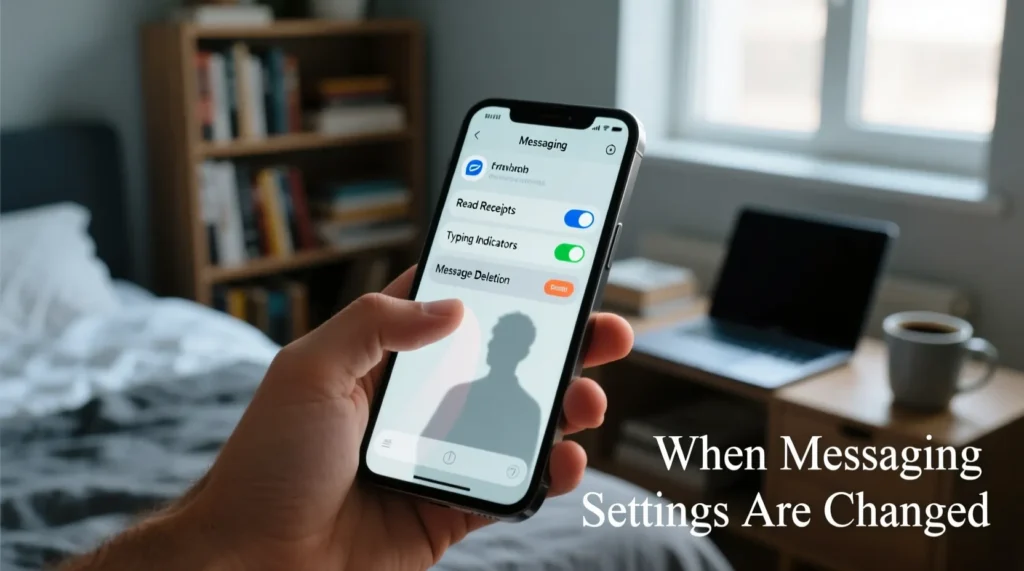
Sometimes, a green text message appears after you change settings.
You may have turned off advanced messaging or chat features by accident.
Open your messaging settings and look for chat, RCS, or similar options.
If they are off, your phone will stick to regular SMS.
Turning them back on can bring back colored or enhanced bubbles.
Some phones ask you to agree to terms for advanced messaging.
If you skipped this, the phone may use only SMS.
Restoring default messaging settings can also help.
Once advanced features are active again, your texts may stop appearing as green.
Settings control more of the appearance than most people realize.
💬 Green Text Message To One Contact Only
You might notice that messages show in one color for most people, but a green text message for a specific contact.
This often means that only that conversation is using basic SMS.
The other person may have turned off advanced messaging.
They might be in an area with poor data coverage.
They could have changed phones or reset their settings.
You can ask them if they changed anything about their messaging app.
If they cannot use advanced messaging, SMS is the safe fallback.
Your phone will still deliver the message if the number is correct.
You do not need to fix anything on your side in this case.
The green color is just telling you the type of message being used.
💬 Green Text Message After Phone Or SIM Change
If you recently changed phones or SIM cards, messages may start showing as green.
Your account settings might not have fully synced.
Advanced messaging or chat features might not be activated on the new device yet.
Open your messaging app and review the setup prompts.
Make sure your number is verified inside the app if needed.
Check that your new SIM is active and recognized by your carrier.
Restart your phone after any big change like a new device or line.
Sometimes you need to re-enable advanced features manually.
Until everything is set, messages may appear as a green text message.
Once setup is complete, enhanced messaging can return to normal.
💬 Does A Green Text Message Mean Something Is Wrong

A green text message does not always mean something is wrong.
It mostly tells you the message is using regular SMS instead of internet-based chat.
Your message can still arrive quickly and safely.
Some people even prefer SMS because it works on almost any phone.
However, if you expected typing indicators, read receipts, or higher-quality media, you might miss those.
If you see green when you expected a different style, check your settings and connection.
You can decide whether you need advanced features for that conversation.
If not, SMS is more than enough for most simple chats.
Green is just another way your phone shows how your message travels.
It is more about the path than the content itself.
💬 When To Look Deeper Into Green Text Message Issues
You only need to worry about a green text message if other problems appear too.
If texts fail to send, get stuck, or never arrive, there may be a bigger issue.
Check your signal strength, data connection, and plan details.
Make sure your number and the contact’s number are correct.
Review your messaging settings to confirm advanced features are on if you want them.
If messages fail for many contacts, contact your carrier for help.
They can check for blocks, restrictions, or network problems.
If everything looks normal and texts still fail, your device may need support or updates.
Green alone is usually harmless, but repeated failures are not.
Pay attention to both the color and the delivery status.
What does “Message Blocking is Active” mean
- Iska matlab aapka SMS send ya receive block ho gaya hai
- Network ya carrier ne messaging service restrict ki hoti hai
- Aap prepaid balance ya plan issue ka shikar ho sakte hain
- Recipient number blocked ho sakta hai
- SIM activation issue bhi ho sakta hai
- Phone settings SMS ko allow nahi kar rahi hoti
- Carrier spam protection active ho sakti hai
- International messaging disable ho sakti hai
- Account suspended ya limited ho sakta hai
- Temporary network glitch bhi reason ho sakta hai
Message Blocking is Active Meaning
- Ye error SMS send failure ko show karta hai
- Carrier ne messaging service block ki hoti hai
- User ke plan mein SMS service include nahi hoti
- SIM inactive ya expired ho sakta hai
- Network restrictions lag sakti hain
- Phone software issue bhi ho sakta hai
- Blocked contacts se message nahi jata
- Billing issue ki wajah se bhi aa sakta hai
- Roaming settings off ho sakti hain
- Temporary server issue bhi ho sakta hai
How to Turn Off Message Blocking
- Phone restart karke check karein
- Airplane mode on/off karein
- SIM ko reinsert karein
- Carrier customer care se contact karein
- SMS service active karwayen
- Balance ya billing clear karein
- Blocked numbers list check karein
- Messaging app permissions allow karein
- Network settings reset karein
- APN settings correct karein
Unable to Send Message – Message Blocking is Active (T-Mobile)
- T-Mobile account restrictions check karein
- Billing overdue ho sakti hai
- SMS add-on disable ho sakta hai
- Network outage ho sakta hai
- SIM provisioning issue ho sakta hai
- Message center number wrong ho sakta hai
- International SMS blocked ho sakta hai
- Device compatibility issue ho sakta hai
- Customer support se reset karwayen
- Account suspension check karein
Message Blocking is Active Android
- Android SMS app glitch ho sakta hai
- Default messaging app change karein
- Cache clear karein
- Network reset karein
- SIM card issue ho sakta hai
- Carrier restrictions apply ho sakti hain
- Software update pending ho sakta hai
- Third-party SMS apps conflict kar sakti hain
- Blocked contacts check karein
- Safe mode me test karein
Free Msg: Message Blocking is Active Meaning
- Ye network-generated error hota hai
- SMS send fail hone ka indication hota hai
- Carrier ne message block kiya hota hai
- Free message system alert show karta hai
- Account restrictions ho sakti hain
- Plan expire ho sakta hai
- Roaming disabled ho sakta hai
- SIM inactive ho sakti hai
- Temporary network error ho sakta hai
- Messaging service disabled ho sakti hai
What is Message Blocking Active
- Ye SMS restriction ka error hai
- Message send/receive block ho jata hai
- Carrier level restriction hoti hai
- User account issue ho sakta hai
- Device settings problem ho sakti hain
- SIM card inactive ho sakta hai
- Network issue bhi cause hota hai
- Billing problem ho sakti hai
- Spam protection trigger ho sakta hai
- Service temporarily unavailable hoti hai
Unable to Send Message – Message Blocking is Active
- SMS delivery fail ho jati hai
- Carrier block laga hota hai
- Network issue ho sakta hai
- Account suspend ho sakta hai
- SIM problem ho sakta hai
- Messaging service disabled hoti hai
- Settings misconfiguration ho sakti hai
- Roaming restriction ho sakti hai
- App bug bhi reason ho sakta hai
- Support se issue fix hota hai
FAQs
What does a green text message mean
It usually means the message was sent as a regular SMS instead of an internet-based chat message.
Does green text message mean I am blocked
Not by itself. Green often relates to message type, not blocking. Blocking usually shows other signs like failed delivery.
Why did my messages change from another color to green
Your phone might have switched from advanced messaging to SMS due to settings or data issues.
Can I change green messages back to advanced chat
Often yes, by turning on advanced messaging or chat features in your messaging settings and having a compatible contact.
Are green text messages less secure
They follow normal SMS rules. Security depends on your network and device, not just the color alone.
✅ Conclusion
A green text message might look surprising at first, but it is mostly your phone’s way of telling you that this message used regular SMS instead of an advanced chat system. It can be triggered by settings, signal, contact type, or recent changes to your phone or SIM.
By checking your data connection, messaging settings, and the type of device the other person uses, you can understand why the bubble turned green and decide whether anything needs to change. In many cases, your messages are still sending just fine, even when the color looks different.

My name is Emma, a writer at msseage.com, sharing clear and helpful content about messages and digital communication.